


Make Me a Cocktail
2.47.00 Reviews
App Specs
- Version
- 3.27
- Updated On
- License
- Free
- Downloads
- 10,000+
- Developer
- Make Me a Cocktail
- Categories
- Food & Drink
- Platform
- Android
Screenshots
 Analysis by AppCompare
I often reach for a cocktail app when I’m hosting and want to use what’s already in the cupboard rather than buy a long list of ingredients. Make Me a Cocktail is built around that practical problem: it helps turn a home collection of spirits and mixers into ideas for drinks, while also offering a way to browse recipes when I’m simply curious. It’s a free Food & Drink app from Make Me a Cocktail, and its focus makes it more useful for planning a relaxed evening than for replacing a professional bartender.
Using it for a shared evening at home
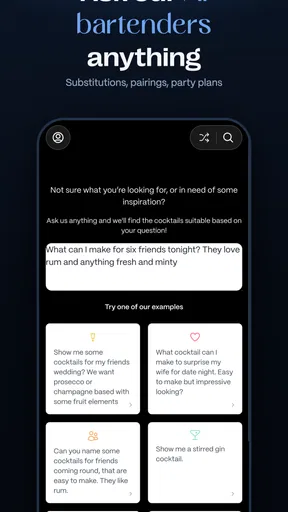
The app works best when there’s a clear occasion behind opening it. Imagine friends are coming over, everyone has different tastes, and the bottles on hand are a slightly random mix. I’d enter the available ingredients in My Bar, then look for recipes that fit what’s actually there. That reverses the usual process of choosing a cocktail first and discovering halfway through that a key mixer is missing.
For a shared device, that workflow is useful but calls for a little care. One person can set up the household’s current ingredients, while others browse ideas and help choose a drink. Before relying on those suggestions, I’d check whether the listed ingredients are still in stock and whether a bottle is already earmarked for another recipe. My Bar is only as helpful as the inventory entered into it; treating it as a live household ledger without keeping it updated can lead to frustrating suggestions.
Setting expectations before everyone starts browsing
Collections, favorites, ratings, and comments give people ways to keep track of what they like. In a shared setting, though, those personal notes can become a little muddled if several people use the same device or account. A rating or comment might reflect one guest’s taste rather than the household’s general verdict. I’d use collections for recipes the group genuinely wants to try again, and treat individual reactions as opinions rather than a definitive score.
That distinction matters when someone else is choosing drinks. A saved favorite can be a useful starting point, but it doesn’t automatically mean that every person at the table will enjoy it. I’d ask about taste preferences and check the recipe itself before mixing, especially if guests are unfamiliar with the ingredients. The app can help with discovery; the host still needs to coordinate what is served.
Coordinating recipes, shopping, and timing
One less obvious advantage of entering ingredients before shopping is that it helps separate “we can make this now” from “we might make this after a quick trip.” I’d browse first, choose a small number of recipes that share ingredients, and only then decide what to buy. That approach can reduce one-off purchases and make a gathering easier to manage. It also avoids the temptation to chase an unusual recipe simply because the Random Cocktail button surfaced it.
Random suggestions are better as inspiration than as a plan for a group. I’d use the button when there’s time to explore, then check whether the drink suits the available ingredients and the people who will be drinking it. For a busy evening, searching by ingredient or cocktail name is more direct. If several people are helping, choosing the recipes before anyone starts pouring keeps the preparation from turning into a string of last-minute substitutions.
Worth Reading Before You Choose

Flipboard Shows What News Apps Must Do Beyond the Feed

Switching to Android Auto Means Rethinking Your Driving Routine

Google Calendar Makes a Crowded Week Easier to Manage

Ludo King Makes the Most of the Minutes Between Plans

Baby Panda World Brings Quick Play to Modern Phones, but Its Game Library Feels Busy

ESPN’s Live Game View Makes Following Close Games Easier
Compared with a simple web search, the app’s ingredient-oriented approach and saved collections can make it easier to return to ideas that worked at home. A paper recipe or a single bookmarked page may be quicker if I already know exactly what I want to make. The app is most worthwhile when I’m deciding among possibilities or trying to use a varied cupboard, rather than when I need one familiar recipe immediately.
Age context and responsible use
The content rating is Teen, but cocktail recipes are still about alcoholic drinks. I wouldn’t treat that rating as a recommendation for young people to prepare or consume alcohol. In a household with teenagers, I’d keep the app’s role clear: adults can use it for cocktail ideas, while younger family members should not be encouraged to mix or drink alcoholic recipes. A content label doesn’t replace household rules or an adult’s judgement.
For adults, the same caution applies to entertaining. A recipe suggestion is not a measure of how strong a drink will feel to a particular person, and browsing a collection shouldn’t replace responsible decisions about serving. I’d read the ingredients and instructions before offering a drink, and make sure non-alcoholic preferences are respected rather than assuming every guest wants a cocktail. The app helps with ideas, not with deciding what is appropriate for each person.
Who will appreciate it—and who may prefer another route
I think this is a good fit for a curious home host, a beginner who wants to explore beyond a couple of familiar mixes, or anyone who likes keeping a record of recipes worth repeating. The combination of searching, My Bar, saved collections, and random discovery supports different moods: practical ingredient matching on one day, browsing for something new on another. Its strongest use is turning a modest home bar into a set of possibilities without requiring the user to know every cocktail name in advance.
It may be less satisfying for someone who wants a highly structured household planning system, a dedicated alcohol-free recipe collection, or a single no-friction reference for one classic drink. It also asks for some effort: ingredients need to be entered, saved items need to be curated, and suggestions need a human check. If I’m not willing to maintain the cupboard list, I’d search manually instead of expecting personalized recommendations to stay accurate.
What to know before installing
The app has an average rating of 2.4 from 27 ratings, so I’d go in with measured expectations rather than assuming every part of the experience will suit me. It has passed 10K installs, and its current version is 3.27. Those figures provide context, but they don’t tell me whether the app’s particular workflow will fit my household; the best test is whether ingredient-based browsing and saved recipes are features I’ll actually use.
It is free to download, with in-app purchases ranging from $4.99 to $129.99 per item. I’d explore the free experience first and make sure I understand any purchase prompt before committing. It is rated Teen and supports Android 6.0 or later. Those details are worth checking against the device and the household’s expectations, especially if the app will be used on a shared phone or tablet.
A practical verdict for the household
For me, Make Me a Cocktail is most useful as a shared source of inspiration, not as an authority on what the household owns or what everyone should drink. I’d keep the inventory current, use collections for genuinely repeatable recipes, and let guests choose based on their own preferences. Those small habits make the app’s suggestions more practical and reduce confusion when several people are browsing on one device.
If you enjoy experimenting and are happy to check recipes before serving, it’s an approachable way to explore home cocktails. If you need a tightly managed shared planner or prefer to avoid alcoholic drink content altogether, a different kind of recipe resource will be a better match. For an informal gathering where the goal is to discover a few appealing options from bottles already at home, I’d give it a try while keeping the final choices—and the responsibility for serving— firmly with the people hosting.
Getting Started with Make Me a Cocktail
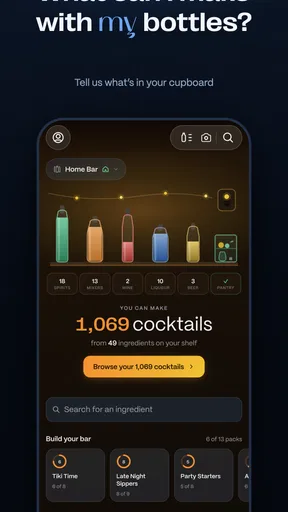
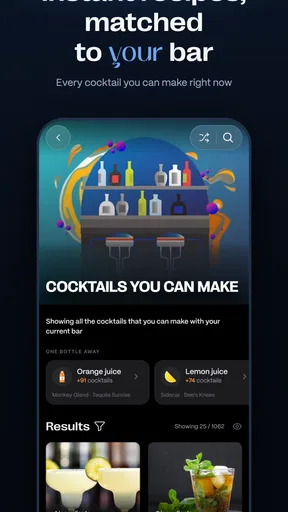
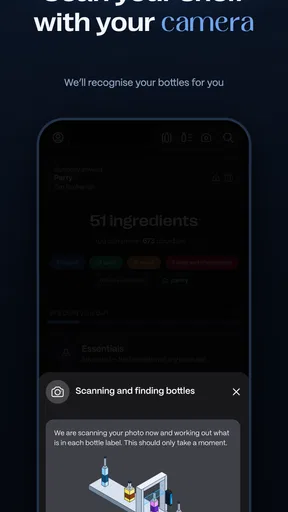
First off, downloading and setting up Make Me a Cocktail is a breeze. Available on both Android and iOS, the app opens up with a sleek interface that immediately makes you feel like you’re stepping into a classy bar. Once you’re in, it’s all about the ingredients. You can input what you’ve got at home, and the app will whip up a list of cocktails you can make right away. Handy, right?
Exploring the Features
The app boasts an extensive database of cocktails, from the classics to some wild concoctions you’ve probably never heard of. You can search by ingredient, name, or even by type of event. So whether you’re planning a quiet night in or a big party, there’s something for every occasion.
One feature that stood out to me was the "Random Cocktail" button. Feeling adventurous? Give it a tap, and the app will suggest something unexpected. It’s a fun way to discover new drinks and maybe even find a new favorite.
Personalization and User Experience
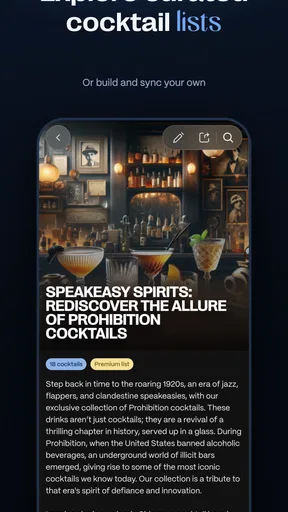
What makes this app particularly user-friendly is its personalization options. You can create your own cocktail collections and save your favorites for easy access later. The app also allows you to rate cocktails and leave comments, which comes in handy if you want to remember what worked and what didn’t.
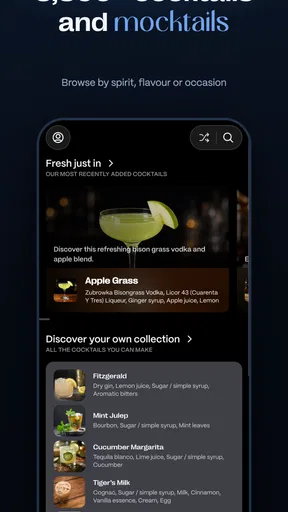
Another cool aspect is the "My Bar" feature. By entering the spirits and mixers you have at home, the app customizes cocktail suggestions based on your inventory. This means less time running to the store and more time enjoying your creations.
Design and Usability
The design of the app is both stylish and intuitive. With a clean layout and vibrant images, it makes browsing through cocktails a visually pleasing experience. Navigation is straightforward, making it easy for anyone to pick up and start using without a steep learning curve.
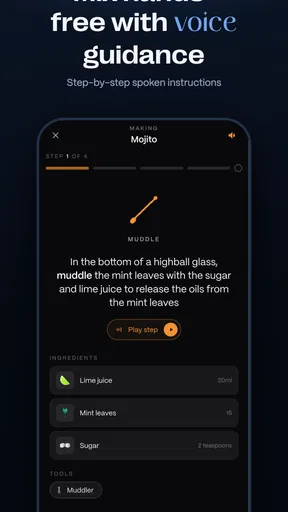
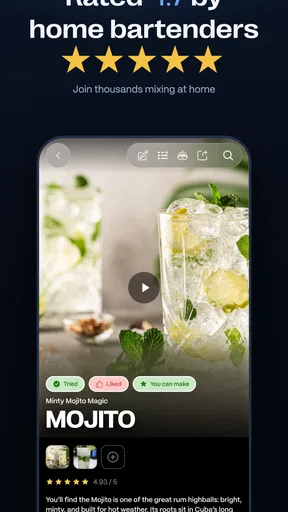
Each cocktail recipe is detailed and easy to follow, with step-by-step instructions and even some history about the drink for those interested in a bit of mixology trivia. Plus, you get to see user ratings, which is always helpful when deciding which cocktail to try next.
Final Thoughts
All in all, this cocktail app is a must-have for anyone who enjoys a good drink. Whether you’re a seasoned mixologist or a complete newbie, the app offers something for everyone. Its user-friendly interface, comprehensive cocktail database, and personalized features make it a standout choice in the world of cocktail apps.
So, if you’re ready to elevate your home bar game and impress your friends with some top-notch drinks, give it a try. You might just find that mixing drinks becomes your new favorite hobby!
Pros
- User-friendly interface for easy navigation.
- Wide variety of cocktail recipes available.
- Option to save favorite cocktails.
- Ingredient substitution suggestions.
- Community-driven recipe contributions.
Cons
- Requires internet connection for full access.
- Some features locked behind premium paywall.
- Occasional ads can interrupt usage.
- Limited non-alcoholic cocktail options.
- Lacks detailed nutritional information.
FAQs for Make Me a Cocktail
What is Make Me a Cocktail and how does it work?
Make Me a Cocktail is a versatile app designed for cocktail enthusiasts and home bartenders. It provides users with an extensive database of cocktail recipes. Simply input the ingredients you have at home, and the app will suggest cocktails you can make. It also offers step-by-step instructions and helpful tips for perfecting your mixology skills.
Is Make Me a Cocktail free to use, or are there in-app purchases?
Make Me a Cocktail is free to download and use with access to a wide range of cocktail recipes. However, it offers in-app purchases for additional features such as premium cocktail collections and ad-free browsing. These enhancements can enrich the user experience but are not necessary for basic app functionality.
Can I use Make Me a Cocktail offline?
Yes, Make Me a Cocktail has an offline mode where you can access saved recipes and some basic features without an internet connection. However, to explore new content, search for additional recipes, and receive updates, you will need to be online. The offline mode is handy for those who want to use the app in areas with limited connectivity.
How often is the recipe database updated?
The recipe database in Make Me a Cocktail is updated regularly with new recipes and trending cocktails. The app team frequently collaborates with mixologists and cocktail enthusiasts to ensure an evolving collection that reflects current trends. Users can expect fresh content and seasonal recipes to keep their cocktail-making experience exciting.
Does Make Me a Cocktail cater to dietary restrictions or preferences?
Make Me a Cocktail includes filters and options to accommodate various dietary restrictions and preferences, such as non-alcoholic options and allergen considerations. Users can customize their search to find recipes that fit their specific needs, ensuring a personalized and inclusive cocktail-making experience.


